



A PIM system, short for product information management system, is software that centralizes all product data in one place and distributes it to every sales channel that needs it. Without one, product data tends to live in spreadsheets, ERP exports, and supplier emails simultaneously, with no single version you can trust.
Key Takeaways
A PIM system is a structured platform with validation, workflow, completeness scoring, and channel-specific output. The business case triggers when product data crosses teams, channels, languages, or trading partners simultaneously. That is when manual coordination breaks down.
PIM, ERP, PLM, MDM, and DAM each cover a distinct domain. Companies often need more than one. Understanding which gap each fills prevents buying the wrong tool.
Governance design determines how fast a PIM delivers value. A system configured without clear data ownership and completeness rules will distribute bad data efficiently. That work happens before go-live.
Syndication is distinct from distribution. Getting data to your own channels is one problem. Getting it to retailer procurement systems and trading partners in their required formats is another, and a PIM should handle both.
Open-source PIM systems like AtroPIM eliminate vendor lock-in and support on-premises or cloud deployment. For organizations with complex data models or strict governance requirements, that flexibility is operationally significant.
What Product Information Means in Practice
Product information is everything a business generates and needs to distribute about its products. The data breaks down into distinct categories, each serving a different audience and purpose.
Basic data covers product name, SKU, GTIN, and identifiers. Technical data includes specifications, dimensions, materials, certifications, and compliance attributes. Marketing content covers descriptions, feature highlights, and channel-specific copy. Assets are images, drawings, videos, and documents linked to the product record. Sales information includes pricing tiers, availability, and channel-specific restrictions. Localized content covers translated descriptions, country-specific regulatory data, and market-adapted variants. Taxonomy defines how products are categorized, classified, and related to each other.
In B2B contexts especially, product data is layered. A single SKU for an industrial valve might carry a standard product name, dimensional drawings, material certificates, pressure ratings, installation instructions in three languages, and country-specific regulatory data. Each attribute serves a different audience: engineering, procurement, logistics, or the end customer. Managing that in a spreadsheet is technically possible, but errors accumulate fast and scale becomes a real problem.
The product record inside a PIM holds all these layers in a structured, validated form. Relationships between products, categories, and assets are explicit rather than implied by column positions or file names.
How a PIM System Works
A product information management system operates across four functional stages: collect, enrich, distribute, and syndicate.
Collect. Data enters the PIM from ERP systems, supplier feeds, internal spreadsheets, and Excel files. Import connectors handle different formats, and mapping rules normalize incoming attributes to your internal data model.
Enrich. Once data is in, product managers complete it. Mandatory fields, completeness scores, and validation rules guide the process. Workflow states control who edits what and when, so marketing cannot publish a product before the technical team has filled the required specifications. Missing or inconsistent data gets flagged before it reaches any channel.
Distribute. Finished records go out through channel-specific output templates. The same product record can populate a Shopify store, an Amazon listing, a distributor portal, and a printed PDF catalog, with each template handling the structural and formatting differences. Adding a new channel means configuring an output template, not rebuilding your data process from scratch.
Syndicate. Beyond your own channels, product data often needs to reach trading partners, retailer systems, and procurement platforms in their required formats. Syndication handles the structural translation: your internal data model maps to the format a specific retailer or marketplace requires, including standard exchange formats like BMEcat and ETIM. For manufacturers selling through indirect channels, this is where significant manual effort is typically eliminated.
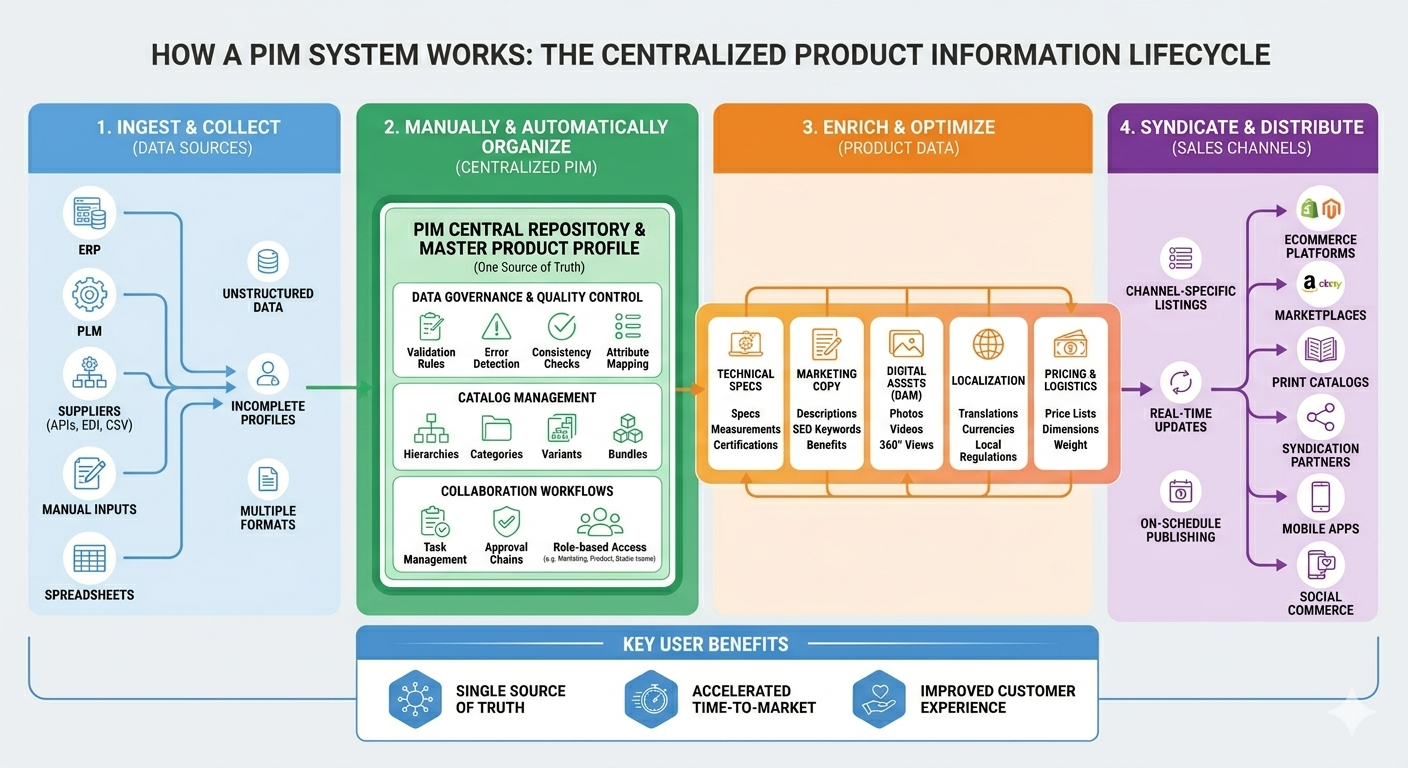
The organizational clarity that a PIM forces is often as valuable as the software itself: who owns which fields, what a complete record looks like, and which team is responsible for each stage. That clarity reduces handoffs and shortens time to market.
When Does a Business Need a PIM System?
Catalog size is one signal, but not the only one. A product information management system starts making sense when any of these conditions apply:
- The catalog exceeds 1,000 SKUs with complex or variable attributes
- Products are sold through more than one channel: e-commerce, print, wholesale, retailer portals
- Multiple teams contribute to product data: product management, manufacturing, marketing, logistics
- The business sells in multiple countries and requires localized content
- Product updates are frequent, and delays in publishing cost money
- Data inconsistency is generating customer complaints, returns, or failed compliance checks
Companies managing fewer than a few hundred simple products in a single channel can often get by with a well-organized ERP or spreadsheet. But once the complexity crosses those thresholds, the cost of fragmented data, in staff time, in errors reaching customers, and in lost sales from incomplete listings, quickly exceeds the cost of implementing a PIM platform.
In projects we implemented for manufacturers of industrial equipment and building materials, the breaking point was usually multichannel distribution combined with localization. The product data existed, often in reasonable shape inside an ERP, but the moment it needed to go to a German distributor portal in German, a UK e-commerce site in English, and a printed catalog with a different attribute set, spreadsheets stopped working. A PIM brought all three outputs from a single record, with one editorial process instead of three parallel ones.
Who Uses a PIM System?
Manufacturers and distributors are the primary users. They manage large, technically complex catalogs that need to reach multiple downstream channels: retailers, wholesalers, e-commerce platforms, and export markets. Industries where product information management systems are common include industrial equipment, building materials, automotive components, electronics, healthcare devices, and consumer goods.
Retailers with large private-label ranges or complex product hierarchies also use PIM systems, though the use case differs. Retailers typically manage supplier-provided data arriving in many formats and need to normalize it into consistent catalog records. Manufacturers control how their product data reaches a fragmented distribution network.
Internally, the main users are product managers, data stewards, and marketing teams. Product managers own the data model and completeness requirements. Data stewards run validation and handle incoming supplier feeds. Marketing teams build channel-ready content against published records rather than chasing down specs from other departments.
Benefits of a PIM System
One source of truth and data governance
Every channel draws from the same product record. When a specification changes, it changes once, and the update reaches every output the next time it is published. The alternative, a specification updated in one spreadsheet but not the distributor feed, is what generates customer complaints and compliance failures.
Governance is built into this model. Role-based permissions define who can edit which attributes, and workflow states enforce approval chains before data reaches any channel. Audit logs track what changed, when, and by whom. For organizations subject to regulatory requirements around product data accuracy, that traceability is not optional. Mandatory fields, completeness scores, and validation rules prevent incomplete or outdated records from being published at all. In B2B contexts this matters especially: a missing technical specification can stall a procurement decision entirely.
Faster time to market
New products move from data entry to publication faster because the workflow is structured and the channel templates already exist. The gain comes from removing handoffs. What used to take a week of back-and-forth between product management, marketing, and the e-commerce team can be published the same day enrichment is complete. The software is not fast by itself; the process simply no longer requires three teams to synchronize files before anything goes live.
Better customer-facing outcomes
Accurate, complete product data reduces returns. Customers who receive exactly what the listing described do not need to send it back. Complete technical specifications reduce pre-sale support load: buyers can answer their own questions from the product content rather than calling a sales rep. In e-commerce, product content quality directly affects conversion rates; incomplete listings lose sales that complete ones would have closed.
Scalable localization
Managing translations and country-specific variants inside a single system is considerably more controllable than maintaining separate files per market. Localization workflows in a PIM let translators work directly on product attributes without accessing the underlying data structure, and without creating separate product records. A manufacturer selling in 15 European markets can maintain a single master record with 15 language variants, all subject to the same validation rules and completeness requirements.
Key Features to Look For
The PIM features that matter most depend on catalog complexity, team size, and distribution requirements. The core capabilities to evaluate:
- Data modeling flexibility. Can you define custom entity types, attribute groups, and relationships, or are you locked into a fixed schema? Complex B2B catalogs often require data models that no vendor builds out of the box.
- Workflow and role management. Structured editorial workflows with status states and user permissions prevent incomplete data from reaching channels and enforce data governance across teams.
- Data validation and completeness scoring. Mandatory fields, conditional validation rules, and completeness indicators are what make quality control scalable.
- Import and export connectors. Native support for ERP integration, supplier feed formats, and channel-specific output templates including syndication to trading partner formats.
- Digital asset management. Linking images, drawings, certificates, and videos directly to product records, rather than referencing external file shares.
- Localization support. Attribute-level translation with locale-specific validation and completeness tracking.
- PDF catalog and product sheet generation. Native output of print-ready catalogs and datasheets directly from product records, without a separate publishing tool.
- AI-assisted enrichment. AI as a separate module for auto-generating descriptions, translating content, or flagging attribute anomalies at scale.
PIM System vs. Related Systems
PIM vs. ERP.
An ERP manages business transactions: inventory, procurement, pricing, and financials. It stores product master records but is not designed to enrich, validate, or distribute marketing or technical content. A PIM is not a replacement for an ERP. They are complementary: the ERP is the operational system of record, and the PIM is the content system of record.
PIM vs. MDM.
Master Data Management (MDM) covers all master data domains: customers, suppliers, locations, and financial hierarchies, as well as products. A PIM is domain-specific. For businesses whose primary master data challenge is product content, a PIM is more focused and usually faster to implement than a full MDM platform.
PIM vs. PLM.
Product Lifecycle Management covers the engineering and design phase of a product: CAD files, bills of materials, change management, and development workflows. It operates before a product is ready to sell. A PIM takes over at the point of commercialization, managing the content needed to market and sell the product across channels. Companies with a PLM in place still need a PIM: the two systems address different stages of the product lifecycle and are not substitutes for each other.
PIM vs. PXM.
Product Experience Management is a framing some vendors use to describe PIM extended with channel-specific personalization, A/B testing of product content, and experience optimization. The underlying data management is PIM; PXM adds a layer of audience-specific content delivery on top. For most B2B manufacturers, a well-implemented PIM already covers the majority of what PXM promises.
PIM vs. DAM systems.
A Digital Asset Management system stores and organizes media files. A PIM links those assets to structured product records. Some PIM systems include native DAM functionality. Others integrate with standalone DAM tools. The key question is whether you need to manage assets independently or always in the context of a product.
In most B2B architecture decisions, the question is not which single system to buy. It is understanding which gap each system fills, so you do not buy a PIM to solve an MDM problem, or an MDM to solve a content enrichment problem.
Why PIM Adoption Is Growing
The product information management market is expanding because the distribution surface for product data keeps growing. More channels, more markets, more regulatory requirements, and more technically complex products all increase the cost of managing data without a dedicated system. Poor product data has measurable consequences: incomplete listings lose conversions, incorrect specifications generate returns, and outdated compliance data creates regulatory exposure.
According to Precedence Research, the global PIM market is valued at $25.22 billion in 2026 and is projected to grow at a 19.22% CAGR through 2035. North America currently holds a 31% market share of the global PIM market.
The growth is driven by e-commerce expansion, regulatory pressure around product data accuracy, and increasing catalog complexity in B2B sectors. Manufacturers in automotive, healthcare, and industrial equipment are particularly active adopters because their products carry dense technical and compliance attributes that cannot be managed at scale in a spreadsheet or ERP alone. Standardized exchange protocols like BMEcat are also accelerating adoption: in sectors where buyers expect structured product data feeds from their suppliers, a PIM becomes a prerequisite for competing in certain distribution channels.
PIM System Deployment Options
On-premises deployments run on your own infrastructure. They suit organizations with strict data governance requirements, sensitive product data that cannot leave a controlled environment, complex integration needs, or existing IT capacity to manage the stack. The trade-off is higher setup cost and internal maintenance responsibility. On-premises also gives engineering teams full control over the data model and integration architecture, which matters when connecting to legacy ERP systems with non-standard APIs.
Cloud-hosted or SaaS deployments reduce infrastructure overhead. Setup is faster, and the vendor manages upgrades and availability. The trade-off is less control over the environment and potential limitations on deep customization. For businesses without dedicated IT capacity, SaaS is usually the faster path to value.
AtroPIM supports both. It is open-source software built on the AtroCore platform, which means you can deploy it on your own servers, in a private cloud, or use AtroPIM's hosted option. There is no vendor lock-in: the data model, the integrations, and the deployment environment are all configurable.
AtroPIM's modular architecture lets you activate additional capabilities as requirements grow, without switching platforms. It also generates PDF product sheets and catalogs natively, which removes a common dependency on separate publishing tools. For a detailed breakdown of the trade-offs, see cloud vs. on-premises PIM.
The deployment model is not just an IT decision. It affects data governance, integration architecture, total cost of ownership, and how quickly your team can adapt the system when requirements change.
What to Expect Before and After Implementation
PIM implementation is not a plug-and-play process. Before you go live, expect to spend time on data modeling, data migration, and integration work. The challenges of PIM implementation are predictable: incomplete source data, unclear ownership of product attributes, and integrations with legacy ERP systems that require custom mapping.
The most common mistake is underestimating the data migration effort. Most organizations discover, during the audit phase, that their existing product data is less complete and less consistent than assumed. Addressing that before migration, rather than after, determines how quickly the system delivers value.
The second most common mistake is skipping data governance design. A PIM enforces whatever rules you configure. If you do not define who owns which attributes, what a complete record requires, and which team approves data before it publishes, the system will faithfully distribute whatever incomplete or inconsistent data it receives. That governance design work happens before go-live, not after.
After implementation, the benefits accumulate over time. Time-to-market for new products drops as teams stop synchronizing files manually. Data error rates fall as validation rules catch problems before they reach channels. Returns decrease as product content becomes more accurate and complete. Localization becomes a structured process rather than an ad-hoc one. The businesses that see the fastest return are those that invest in governance and data modeling upfront, and treat the PIM as an organizational process change rather than a software installation.